
It is critical for marketers to be able to accurately identify the traffic source for their website and app traffic. By accurate, I mean the actual traffic source that was used for this session (or this entry mid-session). Having that information available allows you to properly understand the behaviour of your visitors and the impact of your marketing spend.
Recording actual traffic sources means business logic is applied at query time, whether within a Digital Analytics tool UI or using the raw data in your data warehouse. You can review visitor behaviour based on last click, last non direct click, first click, data driven or any other attribution model. Not to find the correct model (that doesn’t exist) but to understand your visitors and your marketing.
Annoyingly, the reports in the UI of the old Google Analytics and the new GA4 don’t permit this, reporting Direct sessions as their previous non direct traffic source. That data is unreliable to properly understand the impact of your marketing spend, as non-Direct traffic sources are inflated against actual performance.
How about Amplitude?

The Original Approach – User Properties
Amplitude captures the actual traffic source, which is great, but there are flaws in their standard approach using User Properties. Thankfully, they have recently released a new approach, using Event Properties that are “Persisted”, that overcomes most of these flaws. Setting this up correctly, and using in combination with the Amplitude attribution functionality, allows you to better understand visitor behaviour and optimise your marketing efforts.
The Amplitude data structure is built around capturing details of users, the actions they take and details of their actions – equating to user properties, events and event properties. When they introduced Marketing Analytics to their offering, they had to use the same data structure, which doesn’t include the concept of Session properties.
This led to their original solution, using user properties to capture Marketing Parameters. Resetting these at the end of a session effectively made them Session Properties. On paper it looks good but working with this uncovered some flaws:
- The marketing user properties need to expire with the end of a session
- Aligning update/expiration across all marketing properties
- Amplitude bug upon visitor login with a new device – it reverts to the marketing properties from a previous session
The Amplitude Web SDK correctly manages the user property expiration at the end of a session. However, it puts the work on you for app tracking or if using server side tracking for the website. In both cases, you need to manage the logic to reset all marketing properties at the end of a session. A failure to do this results in what is effectively last non direct click tracking.
The Web SDK doesn’t manage the update of all marketing properties if the visitor re-enters the website mid-session. A mid-session change affects at least one marketing property but not all of them, which can lead to a mismatch. An example is referring_domain recording google.com for an Organic Search entry but utm_medium retaining the Email value – that results in the wrong channel being recorded. Every marketer and marketing analyst needs to drill down from channel into the marketing parameters. If the logic is not consistent across all properties, the reporting and analysis breaks.
The final issue is something I stumbled across. Due to the way Amplitude Visitor Matching works, a visitor who logs in and is matched to an existing user ID inherits that user’s user properties. This is fine for most of them but not the marketing properties, we don’t want the traffic source from a previous session.
The New Approach – Persisted Event Properties
This year Amplitude introduced a new approach, it is definitely better.
- The marketing properties are now captured as event properties.
- They are used to generate a Channel Grouping.
- This Channel Grouping is “Persisted” until the end of the Session.
This resolved all but one of the issues with the user properties. As event properties have no memory, they are not affected by login, it is like they are automatically reset with each event. Instead, you define how long properties are remembered with the Persistence functionality, e.g. end of session or with a mid-session traffic source change.
The remaining issue is consistent logic from Channel down to the marketing properties.
Capturing Marketing Parameters as Event Properties
Amplitude has introduced new functionality into its Web SDK and GTM template to automatically populate the marketing event properties. Note the user properties are still there as well, meaning you need to select the correct property scope within Amplitude or hide the old properties. This logic is in place from SDK 2.45.0 onwards for Web but has not yet been enabled for App.
If you are working with App or managing the Web tracking via server side TMS, you need to replicate this logic. The marketing properties that need to be captured with events, when they exist, are utm_medium, utm_source, utm_campaign, utm_content, utm_term, referring_domain and referrer. These need to be captured with the first event of a session for accurate reporting. They can be captured with multiple events (e.g. all events fired on a landing page) but critical to be the first event.
That can cause issues if the first event is the Session Start event, as it cannot be modified manually. The new functionality includes sending marketing properties with the Session Start event, so that solves it for Web. Since you can’t modify the Session Start event with the app SDK, my solution for a web + app business is to make the Session Start event inactive (or to block it) so this event is not included in Session data.
Modifying the Channel Grouping
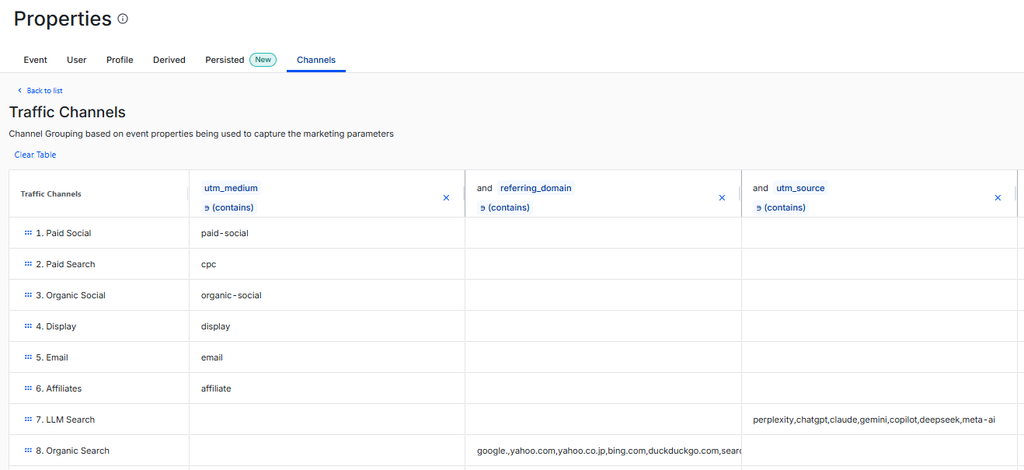
The Channel Grouping logic is the same as normal, except using event properties, not user properties. You will definitely need the utm_medium and referring_domain properties, probably utm_source and maybe others.
The default Channel Grouping can be a starting point but I find it too detailed, it can be better to start from scratch. Don’t forget to include a channel for Internal Referral and a channel for Unidentified Traffic (utm_medium value is not recognised). The final catch all for Direct is no longer required but doesn’t hurt to have there.
Persisting the Channel Property
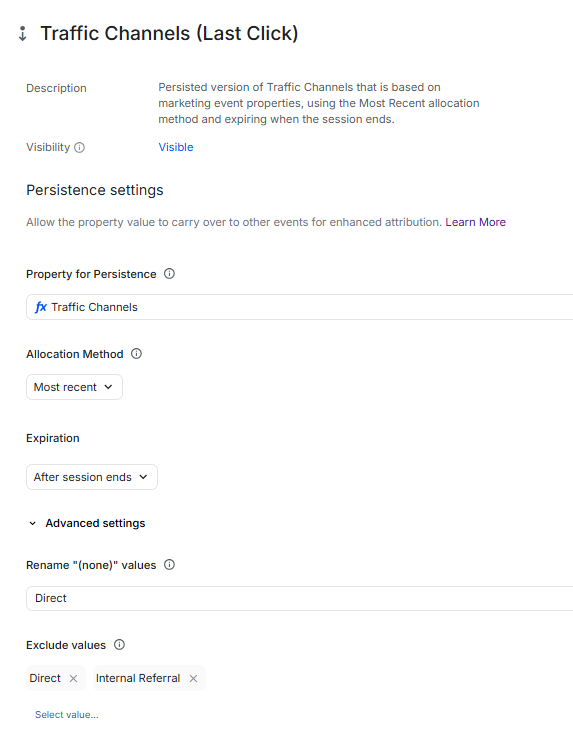
The Persisted Properties can be found in a tab next to Channel Properties. The settings to use are as per below. Give this property a meaningful name as it will be used daily by marketers plus a description.
- Select your channel grouping as the property for Persistence.
- The recommended Allocation Method is Most Recent as this records every traffic source. If you only want the first traffic source of a session, ignoring mid-session updates, use Original
- Expire the Property at the End of the Session
- If you instead expire the property after X days, it is equivalent to using Last Non Direct Click with X days as your lookback window
- Rename (none) values to Direct
- Exclude your Internal Referral channel, any other similar internal channels that you don’t want recorded and Direct if that channel is listed.
Save and you are good to go.
I know the last two settings seem counterintuitive but they are necessary. The Channel Grouping is based on event properties, meaning a traffic source is recorded for every single event. We want to ignore these traffic sources when they are internal or Direct, they only matter when they are a real traffic source – this is what the final setting does. The second last setting then sets the traffic source as Direct when the first event of a Session does not contain any marketing parameters.
Using the Persisted Channel with Attribution Functionality
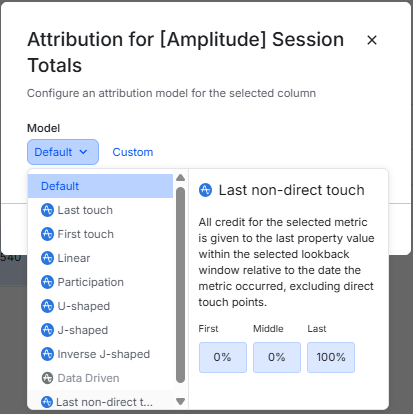
The persisted Channel property can now be used in Data Tables and the metrics can have attribution models applied to them. As I said early on, this is the way marketing reporting should work, capturing the actual traffic source at the start of session or when it changes and then using the Digital Analytics tool to apply attribution logic to better understand visitor behaviour.
I am not a fan of attribution models – they will always be missing data points required for them to be even approximately accurate. But being able to examine behaviour by easily comparing multiple attribution models for a single visitor action, that is definitely useful.
One Issue Remains
The issue that has not been fixed with this switch from user to event properties is to update all marketing properties whenever one marketing property changes. Without this, you cannot drill down in reporting from Channel to the utm_campaign or referring_domain or any of the other properties with consistent logic.
With event properties, only the Channel is persisted, not the original marketing properties. You could persist them all one by one but then it is back to the same issue as user properties, they don’t update together. I have raised this with Amplitude as an issue they need to solve. But in the meantime, I thought of a workaround (which I think actually replicates what Google Analytics did behind the scenes).
I use derived properties to align all the marketing properties so that when one changes, they all update. One side effect is it populates the utm_medium when it is a non-tagged traffic source, that is what reminds me of GA. There is a derived property for all the marketing parameters and I then persist these marketing parameters, using the same logic as for the Channel.
But that is enough for this post, the details of how that solution works will follow in my next blog post.


