
My previous blog post detailed the new solution from Amplitude for capturing marketing information within the tool:
- Capture marketing parameters as event properties
- Use these to generate a Channel Grouping property
- Persist this Channel Grouping on a Most Recent basis until the end of the Session
This is the replacement for the original approach of capturing marketing information in user properties and resetting at end of session or with a new traffic source mid-session. It is great but incomplete, there is one issue from the old solution that it doesn’t resolve.
You have a nice report showing performance by channel. One of the first actions you will want to take is to click through to view campaign (or other property) for the channel. This is not built into the solution, only the channel property is persisted.
You can just persist all of the marketing event properties but this will lead to mismatches. The persisted properties will not align to the persisted Channel if they persist while a different marketing property is updated. An example is referring_domain recording google.com for an Organic Search channel change mid-session but utm_medium persisting with the Email value from the start of the session. The channel will correctly be Organic Search but the persisted utm_medium property will report as email, not organic search.
My Solution for this Issue
I had been aware of this issue for a while but put it to one side while working to get the Channel reporting right. Good and bad news, I woke up at 4am one morning with the solution in my head.

I could create a derived property that combined the utm_medium and referring domain properties, using this new property to identify when a traffic source changes. Upon a change, I can update a derived property for all marketing properties, either recording their new value or resetting to a null value. These derived properties could be persisted and would reflect the logic of the channel.
Back to sleep for a couple more hours…
Interestingly, I feel this is the solution Google Analytics has used for years. It explains why they populate the utm_medium and utm_source dimensions for Organic Search and Referral traffic. That is basically what I woke up thinking of as it makes it easier to manage the link between tagged and untagged traffic sources.
Creating the Solution
My idea was to create a set of Amplitude Derived properties that replicate the logic within the Channel Grouping property, using multiple IF statements and contains/regex matches. My coding at that level is decent but rusty. So I did what we all do now and turned to Claude. It was an intensive few hours but produced a solution that worked. There was a bit of testing and fixing involved in the following week to get the logic right but Claude and I got there.
However it did mean maintenance was going to be potentially painful. Any change to your channel grouping logic, using that nice clean visual interface, would need to be replicated within at least one of the derived properties. The more columns within the channel grouping, the more custom logic needed in the derived properties.
After a couple of weeks, I had the idea to use another Channel Grouping to maintain a list of External Domains. It would still need to be maintained in two places but at least it would be in a visual format, not written using code. Claude did me one better, asking why not just use the original Channel Grouping property itself. Looking into this, we were able to remove most of the tricky logic in the code and three of the more complicated derived properties.
Ok – occasionally Claude’s guesses get lucky.
That leaves us with:
- rd_external:
- records the referring_domain
- unless it was an internal domain, in which case it is blank
- utm_medium_x
- records the utm_medium where available
- otherwise the channel name (lowercased) from the channel grouping
- blank for Direct traffic
- utm_source_x:
- records the utm_source where available
- the external referring domain when no utm_source
- blank for Direct traffic
- utm_[campaign/content/term]_x
- records the utm_[campaign/content/term] where available
- “not provided” if not available where there is a valid utm_medium“not applicable” where utm_medium was blank
- blank for Direct traffic
- [referring_domain/referrer]_x:
- records the external [referring domain/referrer] where available
- “no external referrer” where non direct traffic source but no external referrer
- blank for Direct traffic
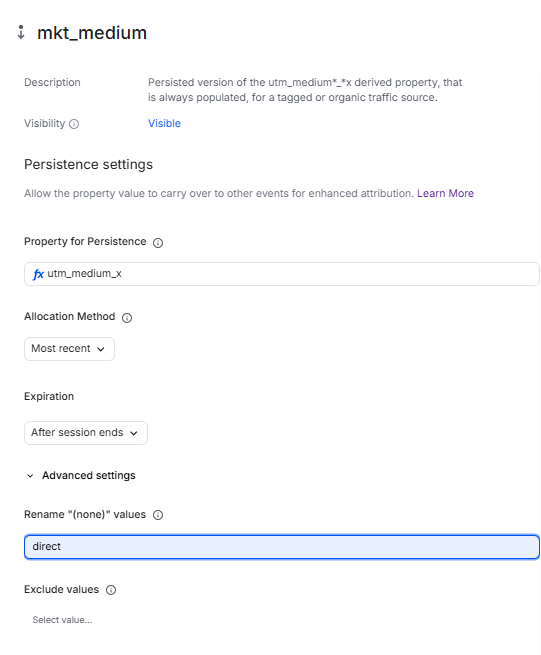
The *_x properties are the properties that need to be persisted, with the same logic as Channel i.e. record the most recent property value, expire at end of session and replace (none) with “direct”. No values need to be excluded with these properties as they are blank when there is not a new traffic source.
Get all this right and you have a working solution where you can drill down from channel to marketing property with consistent logic.
Code Examples
rd_external
IF(AND(PROPERTY('referring_domain','event') does not contain "<example domain 1>", PROPERTY('referring_domain','event') does not contain "<example domain 2>", …), PROPERTY('referring_domain','event'),'')utm_medium_x
IF(OR(PROPERTY('<channel grouping>', 'derived') == "Direct", PROPERTY('<channel grouping>', 'derived') == "(none)", PROPERTY('<channel grouping>', 'derived') == ""), '', IF(PROPERTY('utm_medium','event') != "(none)", PROPERTY('utm_medium','event'), LOWERCASE(PROPERTY('<channel grouping>', 'derived'))))utm_source_x
IF(OR(PROPERTY('utm_medium_x','derived') == "(none)", PROPERTY('utm_medium_x','derived') == ""), '', IF(PROPERTY('utm_source','event') != "(none)", PROPERTY('utm_source','event'), PROPERTY('rd_external', 'derived')))utm_campaign_x (repeat for utm_content_x and utm_term_x)
IF(OR(PROPERTY('utm_medium_x','derived') == "(none)", PROPERTY('utm_medium_x','derived') == ""), '', IF(PROPERTY('utm_campaign','event') != "(none)", PROPERTY('utm_campaign','event'), IF(PROPERTY('utm_medium','event') != "(none)", "not provided", "not applicable")))referring_domain_x
IF(OR(PROPERTY('utm_medium_x','derived') == "(none)", PROPERTY('utm_medium_x','derived') == ""), '', IF(PROPERTY('rd_external','derived') contains ".", PROPERTY('rd_external','derived'), "no external referrer"))referrer_x
IF(OR(PROPERTY('utm_medium_x','derived') == "(none)", PROPERTY('utm_medium_x','derived') == ""), '', IF(AND(PROPERTY('rd_external','derived') contains ".", PROPERTY('referrer', 'event') != "(none)"), PROPERTY('referrer', 'event'), "no external referrer"))Remaining Challenges
A frustrating challenge is that we need to ensure everyone in the business uses the persisted properties when they access the data, via the UI or via AI. We also need the same logic to be created within the DWH, for anyone directly accessing the data there or via a BI tool that is using this data. Maintenance remains an issue. It is simpler within the UI now, just need to keep the list of internal domains consistent. But it does still need to be maintained across all channels in the DWH, that will be trickier.
What a surprise, Data Governance is critical for getting ongoing value from Digital Analytics data. The need for consistent logic across platforms is another way of saying we need a semantic layer (or the equivalent to it).
Just a couple of weeks ago, I would have listed here various functionality requests that I was waiting on. But it has been a rapid release schedule at Amplitude and we can now use these persisted properties with attribution functionality, including session metrics and with the new Advanced Segmentation.
I have uncovered and reported some bugs when using the persisted marketing properties with all the new functionality. Amplitude is working on these and is aiming to fix them soon, I’m hopeful that all will be resolved by the end of Nov. Just be aware and sense check your marketing data, report any issues that you uncover to Amplitude.
Please let me know how you go with creating this solution within your own Amplitude set-up. I am assuming that there will be a permanent solution created within Amplitude at some point, that this is the temporary workaround until that is done. I am happy to answer any questions but also interested in hearing of your experience with Amplitude and Marketing Analytics.

