A quick small addition but a goodie. Details are below for an easy solution to expose your event timestamps within Amplitude using derived properties.
A pain point of mine with Amplitude has been the lack of date/time properties to use in charts. The main use case here is debugging. You have User Profiles which is an incredibly useful function that I probably use daily. But there are limitations:
- No derived properties are displayed
- No persisted properties are displayed
- No visibility into when user properties are set
- The properties for an event can only be reviewed event by event
I want to be able to add a timestamp property next to event name within a Data Table with Any Event or Any Active Event as the metric. Filter this column on a single user and sort the table based on the timestamp. This would produce the user stream by event in sequence. Adding one or more comparison properties (user, event, derived, persisted) would give the quick debugging functionality that I am missing.
There is an Event Hour of Day and Event Day of Week but that is it – these do not deliver what we need. The data is there obviously though, every event has a timestamp attached to it.
Usually when I hit this limitation in my work, I quietly curse and move on but this time I asked about this missing property (maybe slightly vented about it). My amazing support person Liza Koronaeva pointed me to the Event Time property. This property would be great but is weirdly only available as a filter, not as a group by. It can’t be added as a column which is why I hadn’t previously noticed it. That’s when she had the genius idea to create the needed properties as derived properties.
It’s my favourite type of solution, a simple one. The derived properties as follows:
- Event Timestamp: SPLIT(LONG_TO_TIME(PROPERTY(‘_time’, ‘amplitude_user’)), “T”, 1)
- Event Date: SPLIT(LONG_TO_TIME(PROPERTY(‘_time’, ‘amplitude_user’)), “T”, 0)
Or you can pull the full timestamp directly rather than splitting them (most useful if user stream is across multiple days, so you only need one column, not two)
- Event Full Timestamp: LONG_TO_TIME(PROPERTY(‘_time’, ‘amplitude_user’))
The output doesn’t include a timezone but my investigations suggest the event time is based on the timezone defined for your project. It doesn’t actually matter when looking at a single user or session though, just having the sequence is the important part.
And that is it. An example can be seen in this screenshot of a filtered user with a changing mkt_channel (which is a persisted channel grouping based on marketing event properties). It’s really easy now to see exactly when new marketing event properties were recorded, with these used to update that persisted property.
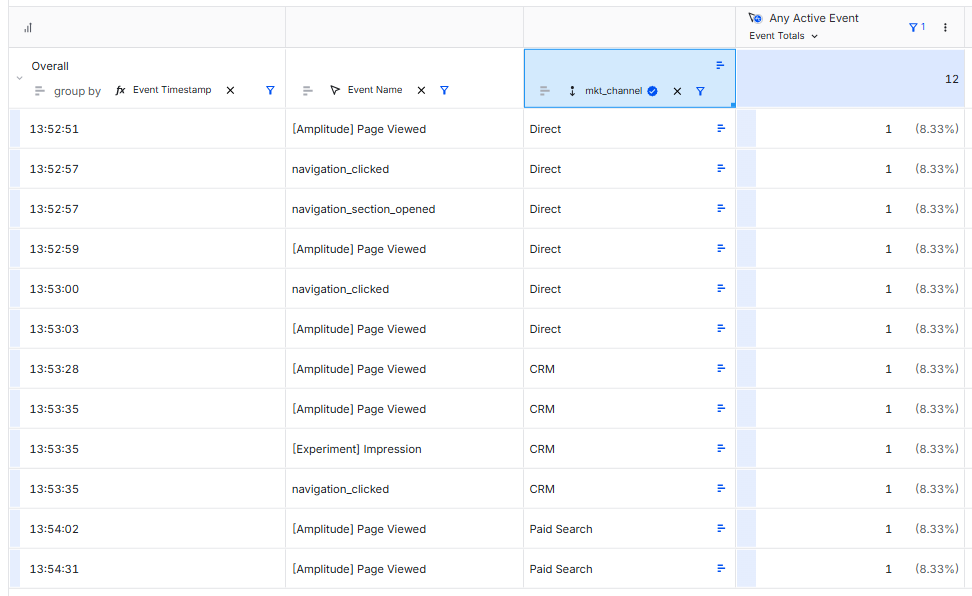
The same approach can be used to investigate anything similar. I plan to discover exactly when the login state is switched from logged out to logged in. As per the above example, debugging values recorded for marketing purposes for any of the marketing properties, and ensuring they are aligned, will be a recurring use case.
I am sure there are plenty more and I will use these properties in the days, weeks & months to come (remembering to quietly thank Liza each and every time). Please share any use cases you have, whether debugging or otherwise.
I am also making a request to Amplitude to make these default properties for all of their clients – people should not have to create derived properties to have these properties at their fingertips.